
BuildPlot3D · free to try · no sign-up
Deck design software for builders
Plan the footprint, look at the frame in 3D and check what you need to buy. BuildPlot3D runs in your browser, with deck and pergola material take-offs for the UK, Ireland, the US and Canada. Costs appear only when you enter your own supplier rates.
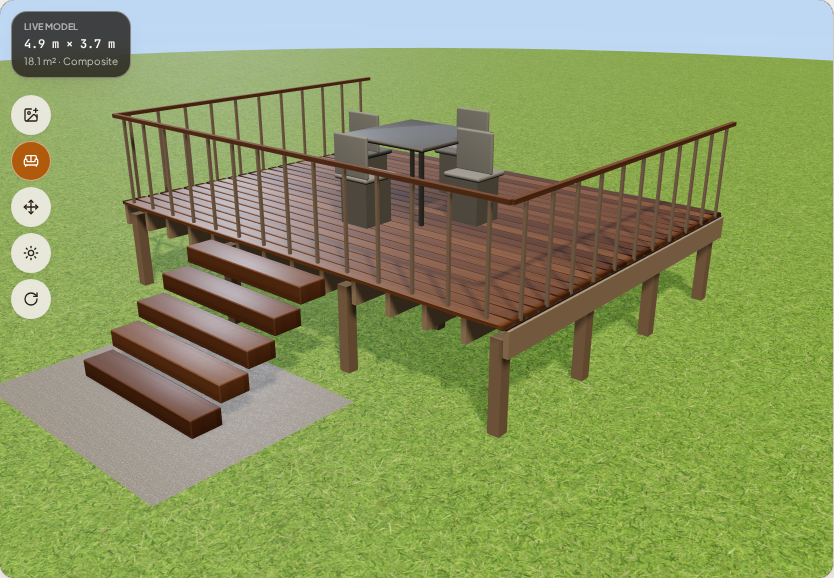
From a site measurement to a material list
1. Draw the deck
Set width, depth and height in metres or feet. Choose a rectangular, L-shaped or U-shaped footprint, then add railing, stairs or an open-roof pergola. Rotate the model and inspect it from plan, front and side views.
2. Check the quantities
Inspect boards in stock lengths, joists and their spacing, beams, posts, footings and fixings. Stairs, railing and pergola materials follow the options you selected. The take-off includes a waste allowance; check the chosen stock sizes against what your supplier actually sells.
3. Add your rates and choose your files
Enter the rates you pay for materials to calculate costs. Download a free summary report, or buy the full build pack for the dimensioned plan, cut list, yard order sheet, merchant CSV and build order.
Is this the right kind of deck software for your job?
Use it when you need to compare a deck layout and inspect a material list before ordering. It is also useful for showing a homeowner the proposed footprint, height, railing and stairs. There is nothing to install and no sign-up is needed to draw a deck and check the take-off.
It is a focused deck tool, not a general CAD editor. You cannot draw arbitrary buildings or treat the output as an engineer-approved construction design. Regional defaults help with planning; they do not establish that a particular site, timber grade or connection is safe.
What still needs checking on site?
Confirm spans, timber sizes and grades, soil and footing requirements, ledger attachment, connections, stair geometry and guarding against local requirements. Follow the board manufacturer's instructions for spacing and fixings. Get professional structural advice where needed. A paid pack contains planning documents, not a permit application or structural certification.
Free take-off or paid build pack?
Free in the designer
The 3D design, inspectable material quantities, costs from your own rates and a summary PDF. Start here to check whether the layout suits the job.
Full build pack
Dimensioned plan, cut list, setting out, audited yard order sheet, merchant CSV, build order and customer acceptance, with your company name. A one-off pack purchase applies to that job and does not expire.
Check pack pricing and plansStart with the measurements you have
Open the designer for a complete layout, or use the decking calculator for a first board and frame count. You can inspect the quantities before deciding on a pack.